Luma Game Guide
Drive Mad Walkthrough: Controls, Tips & Hard Level Fixes
Stuck on a flip, jump, seesaw, or monster truck stage? Start with the quick fixes, then use the level-type guide below.
Quick answer
Quick Answer: What to Try When You Are Stuck
If a Drive Mad level feels impossible, slow down before changing the route. Most failed attempts come from landing with the gas held down, entering a ramp too fast, or fighting a moving obstacle instead of waiting for its cycle. The fastest fix is to release before landing, use tiny taps on balance sections, and commit with steady speed only on long jump or momentum stages.
- Flipping on landing: release the gas earlier and let the nose drop before touch-down.
- Falling off narrow rails: use short taps instead of holding the throttle.
- Missing a jump: build speed before the ramp, then stop accelerating as the wheels leave it.
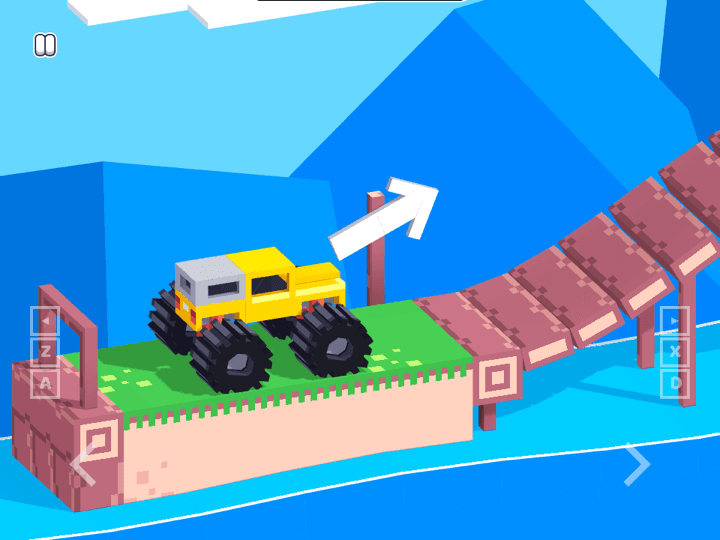
Drive Mad is a physics-based stunt driving game where one throttle controls everything: acceleration, mid-air rotation, balance, and how hard you land. There are over 200 levels, and the difficulty is almost never about speed — it is about timing and reading what each obstacle wants you to do.
This walkthrough is organised by the problem you are facing, not by a dry level-by-level dump. Drive Mad reuses the same patterns over and over: landing cleanly, keeping balance, carrying momentum, waiting for cycles, and using the vehicle weight. Once you recognise the pattern, you can solve new stages without memorising every level.
Search by Problem: Pick the Fix Fast
Use this mini index if you came from a specific long-tail search. Drive Mad does not need a different secret route for every level; it needs the right fix for the failure pattern you keep seeing.
- “Drive Mad why does my car flip?”: stop accelerating before the landing and tap only after the wheels settle.
- “Drive Mad level tips”: identify whether the stage is timing, balance, momentum, landing, or mechanism-based before retrying.
- “Drive Mad mobile controls”: use shorter taps than on keyboard, because touch pedals make it easy to over-hold the throttle.
- “Drive Mad no download”: use the browser version first; avoid APK mirrors, mod downloads, and pages that ask for plugins.
Controls & the One Rule That Matters
You only really control the gas. Hold to accelerate, release to ease off — and that same throttle is how you tilt the vehicle in the air and settle it on landing. The single most important habit: let go of the gas before you land. Coasting onto a ramp or platform keeps the nose level, while flooring it launches the front end up and flips you onto your roof.
- Hold gas = accelerate and rotate the nose backwards (wheelie / backflip).
- Release gas = let the nose drop and the body settle level.
- Feather it = short taps to crawl across narrow or fragile sections.
The 5 Level Types and How to Beat Each
Almost every Drive Mad stage is one of these five patterns. Diagnose the pattern first, then apply the fix.
- Timing levels: a moving hazard swings or rotates on a fixed cycle — wait for the gap, do not force it. Patience beats throttle here.
- Balance levels: seesaws and narrow rails punish overcorrection. Use tiny taps, never full throttle.
- Momentum levels: you fail if you lose speed at the wrong moment — commit early and keep a steady pace through the obstacle.
- Landing levels: control the nose angle before touchdown by easing off the gas; aim to land on all wheels, not nose-first.
- Mechanic levels: one special object (a button, a box, a lift) is the whole puzzle — figure out what it does before you drive.
Universal Techniques That Clear Tricky Stages
These few tricks solve a large share of the stages players get stuck on. When a level looks impossible, it usually wants one of these.
- Box bridges: push a loose box into a gap to make a temporary ramp or floor, then drive across it.
- Use your weight: roll the heavy truck onto a platform or button to sink it, tip a seesaw, or trigger a mechanism.
- Half-throttle launches: match your launch speed to the gap width — most failed jumps are from too much speed, not too little.
- Rhythm matching: against swinging or rotating obstacles, sync your movement to their cycle instead of rushing.
The Monster Truck Levels (2025 Update)
The November 2025 update added a new block of monster truck stages. The truck is heavier and more top-heavy, so it flips more easily but can also crush and trigger things a normal car cannot. Treat throttle even more gently — the extra weight means a small over-rev rolls you. Lean on the use-your-weight trick: the monster truck is built to smash through and press down on objects that block lighter vehicles.
How to Play Drive Mad Unblocked & Free
Drive Mad runs directly in your browser on desktop and mobile — no download, no install, and no account. Because it is a lightweight HTML5 game, it loads on school and work networks where heavier sites are blocked, which is why people search for it as “Drive Mad unblocked.” Just hit play on the embed above and your progress is kept in the browser session.
Featured Picks
Each recommendation opens a browser player from its detail page with no download required.
Tunnel Rush
Tunnel Rush is a high-speed reflex game where survival depends on reading shapes early and staying centered before the tunnel speed rises. The strongest runs come from small steering corrections, calm visual focus, and learning repeated obstacle patterns.
For pure reflex pressure, Tunnel Rush throws you down a spinning 3D tunnel of obstacles — a great palate cleanser between Drive Mad attempts.
Big Tower Tiny Square
Big Tower Tiny Square is a precision platformer about patient climbing, double-jump timing, and learning each hazard pattern before committing. The tower looks simple, but every spike, laser, and moving platform asks for controlled jumps instead of rushing.
If you enjoy reading physics and nailing exact jumps, Big Tower Tiny Square is a brutal-but-fair precision platformer worth your next run.
Frequently Asked Questions
- How many levels does Drive Mad have?
- Drive Mad has over 200 levels, including a block of monster truck stages added in the November 2025 update. New levels are added periodically, so the exact count keeps growing.
- How do you beat the hardest Drive Mad levels?
- Most hard levels are balance or landing puzzles. The key is releasing the gas before you land so the vehicle settles level instead of flipping, and using tiny throttle taps on seesaws and narrow rails instead of full acceleration.
- Why does my car keep flipping in Drive Mad?
- You are usually holding the throttle too long. Release before the wheels touch down, let the front end drop, and use short taps after landing instead of immediately accelerating again.
- What are the controls for Drive Mad?
- You control a single throttle — hold to accelerate, release to ease off. That same input also rotates the vehicle in the air and controls how it lands, so learning when to let go of the gas is the whole game.
- Is Drive Mad free to play and unblocked?
- Yes. Drive Mad is a free HTML5 browser game with no downloads or account required. It runs on most school and work networks, so you can play it unblocked directly on this page.
- Can I play Drive Mad on mobile?
- Yes. Drive Mad works in mobile browsers using on-screen pedals, with the same physics as the desktop version.
- Where is the official Drive Mad source?
- Drive Mad is a Fancade game by Martin Magni. The safest external references are the Fancade listing, DriveMad.com, and Martin Magni’s own website; avoid unofficial APK mirrors or pages that require plugins.
Jump into Drive Mad free in your browser, then come back to this guide whenever a level traps you.
Related Guides
Official & Reference Links
Use these external links to verify the game source and creator context; they do not imply a commercial partnership with Luma.
- Drive Mad on Fancade →
The Fancade listing for Drive Mad by Martin Magni.
- DriveMad.com →
Official Drive Mad web hub with Fancade and creator context.
- Martin Magni →
Creator website for Drive Mad, Fancade, Mekorama, and related games.