Luma Game Guide
Drive Mad Level Tips for Hard Stages
Use this problem-based guide when a Drive Mad stage keeps flipping your car, dropping you from a bridge, or punishing tiny control mistakes.
Quick answer
Quick Answer: How to Beat Hard Drive Mad Levels
When a Drive Mad level feels impossible, stop holding the throttle through the whole obstacle. Release before landing, tap across balance sections, wait for moving mechanisms, and use steady speed only when the stage clearly asks for momentum.
- Car flips after a jump: release before the wheels touch down.
- Bridge or rail drops: use short taps and let the car settle before the next input.
- Mobile controls feel wild: tap lighter than you would press a keyboard key.
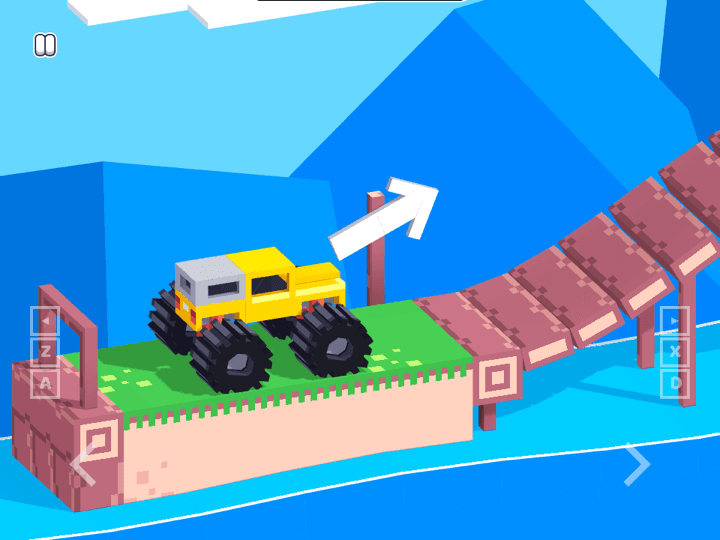
Players often search for a single Drive Mad level number, but the game is better solved by failure pattern. A jump stage, a bridge stage, a seesaw stage, and a monster-truck stage all ask for different throttle habits. This page focuses on the repeatable fixes you can apply when you are stuck, without pretending that every version of the game has identical level numbering.
Keep the game open above, test one fix at a time, and reset only after you know why the last attempt failed. That is faster than full-speed retrying, and it also works better on mobile where a long press can easily become too much throttle.
Why Your Car Keeps Flipping
Most flips are caused by carrying throttle into the landing. Holding gas keeps the nose rising, so the car lands rear-heavy and rolls over. The fix is to stop accelerating before touchdown, let the front wheels drop, and wait until the vehicle is level before tapping again.
- On ramps, build speed before the ramp, not after leaving it.
- In the air, release early if the nose is too high.
- After landing, tap once to stabilize before committing to full speed.
Bridge, Rail and Seesaw Stages
Narrow surfaces punish overcorrection. If the stage uses a bridge, rail, plank, seesaw, or fragile platform, treat the throttle like a balance tool instead of a speed tool.
- Use one short tap, wait for the car body to settle, then tap again.
- On seesaws, reach the pivot slowly and let weight move the board.
- If the bridge bends or moves, pause before the final push instead of charging through.
Jump and Gap Stages
A jump usually fails for one of two reasons: not enough speed before the ramp, or too much throttle while airborne. The clean attempt is a two-part rhythm: accelerate early, then release as the car leaves the ramp so the landing angle stays flat.
- Short gap: half speed is often safer than full speed.
- Long gap: build speed on the approach, then stop correcting in mid-air.
- Landing ramp: aim to match the slope rather than land nose-first.
Mobile Control Tips
Drive Mad can be played on mobile, but the virtual pedal makes long presses easy. Treat every input as a tap unless the level obviously needs momentum. If the vehicle keeps popping into a wheelie, your thumb is staying down too long.
- Use landscape if the game area or pedals feel cramped.
- Tap in short pulses on balance levels.
- Avoid playing with low battery mode or overloaded tabs if input feels delayed.
When to Use the Full Walkthrough
This page is for fast fixes by problem type. Use the main Drive Mad walkthrough when you want the broader controls explanation, official source notes, monster-truck context, and related precision games.
Featured Picks
Each recommendation opens a browser player from its detail page with no download required.
Drive Mad
Drive Mad is a physics driving challenge where the hard part is not raw speed. Each level asks you to control throttle, rotation, landing angle, and vehicle balance with very small inputs, so the best runs feel more like careful puzzle solving than racing.
Open the full Drive Mad game page if you want the focused playable entry with game details and related browser picks.
Big Tower Tiny Square
Big Tower Tiny Square is a precision platformer about patient climbing, double-jump timing, and learning each hazard pattern before committing. The tower looks simple, but every spike, laser, and moving platform asks for controlled jumps instead of rushing.
A precision platformer for players who like diagnosing why a jump fails and then shaving down the mistake.
Frequently Asked Questions
- Why does my car flip in Drive Mad?
- You are usually holding the throttle too long. Release before landing, let the nose drop, and tap again only after the wheels settle.
- How do I beat bridge levels in Drive Mad?
- Use short throttle taps and pause when the bridge or plank moves. Charging forward usually throws the car off balance before the far side.
- Are there exact Drive Mad level answers here?
- No. This page avoids unverified level-number claims because Drive Mad versions and portals can differ. It gives problem-based fixes that apply across hard stages.
- Is Drive Mad easier on desktop or iPhone?
- Desktop keyboard control is usually more precise. iPhone works, but you need shorter taps and should rotate to landscape if the canvas feels cramped.
- Should I download a Drive Mad mod to clear hard levels?
- No. Use the browser version and avoid APK mirrors, mod downloads, and plugin prompts. The hard levels are designed around throttle timing, not downloads.
Try another precision game when you need a break from a hard Drive Mad stage.
Related Guides
Official & Reference Links
Use these external links to verify the game source and creator context; they do not imply a commercial partnership with Luma.
- Drive Mad on Fancade →
The public Fancade listing for Drive Mad by Martin Magni.
- DriveMad.com →
Official Drive Mad web hub and source context.