Monster Tracks
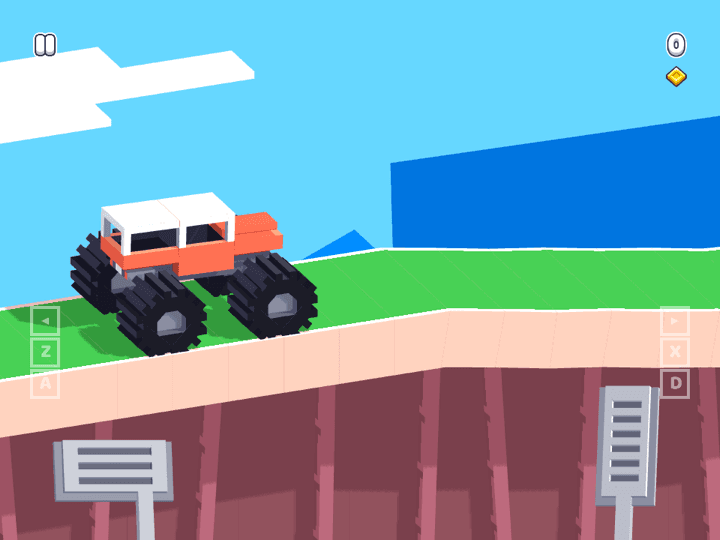
Monster Tracks is a side-view truck challenge where balance is the real difficulty. The vehicle can climb rough terrain, but careless throttle makes it tip, bounce, or land nose-first before the finish.
Monster Tracks
The third-party game loads only after you click, keeping the first view faster.
💡Use in-game fullscreen; controls are listed below.
Today's picks
Try another game
Monster Tracks quick guide
Monster Tracks is a side-view truck challenge where balance is the real difficulty. The vehicle can climb rough terrain, but careless throttle makes it tip, bounce, or land nose-first before the finish.
What to focus on while playing
The best runs are controlled, not fast. Read the slope, tap the throttle before bumps, and let the truck settle after jumps instead of holding acceleration through every obstacle.
Use this page as a browser-play reference for vehicle balance, landing recovery, and safe no-download play before switching to related physics driving guides.
How to play
- 1Drive across uneven tracks, climb obstacles, and reach the finish without flipping.
- 2Use throttle carefully on slopes so the truck does not rotate too far.
- 3After jumps, release input briefly to let the suspension settle before the next climb.
Controls
Accelerate
Hold the throttle key or touch control to move forward.
Balance
Release or tap the input to manage tilt and landing angle.
Restart
Use the in-game restart when the truck is stuck or flipped.
Practical tips
- ✓Do not hold throttle on every hill; short taps keep the truck from rotating too far.
- ✓Land with the wheels as flat as possible before starting the next obstacle.
- ✓If the truck flips backward, enter the slope slower instead of adding more speed.
- ✓Mobile players should use shorter taps because touch throttle is easy to over-hold.
FAQ
- How do you stop flipping in Monster Tracks?
- Use shorter throttle taps and release before the truck reaches the top of steep bumps or ramps.
- Is Monster Tracks like Drive Mad?
- Yes, both are physics driving games, but Monster Tracks focuses more on truck balance and rough terrain.
- Does Monster Tracks need a download?
- No. Play in the browser on Luma and avoid APKs, installers, or browser extensions.
Related guides
Today's picks
Try another game
Game Info
Status
Active
👨💻Listed Source
4399 游戏平台↗This is public source or distribution-page information, not a verified original developer claim.
💡Game Tips
- ✓Do not hold throttle on every hill; short taps keep the truck from rotating too far.
- ✓Land with the wheels as flat as possible before starting the next obstacle.
- ✓If the truck flips backward, enter the slope slower instead of adding more speed.
- ✓Mobile players should use shorter taps because touch throttle is easy to over-hold.
Similar Games

Adam and Eve 4
Adam and Eve 4 is a light point-and-click puzzle adventure where progress comes from reading the scene before clicking. The best approach is to test objects in order, notice what changes, and avoid random clicking that makes the puzzle harder to understand.

Adam and Eve 5: Part 1
Adam and Eve 5: Part 1 is a point-and-click puzzle adventure where every scene is solved by changing the environment in the right order. The fastest progress comes from spotting the obstacle, testing nearby objects once, and watching each animation before choosing the next click.

Adam and Eve 5: Part 2
Adam and Eve 5: Part 2 continues the point-and-click puzzle format with new scenes and slightly trickier object order. Good runs come from treating each screen like a chain: solve the blocker, watch the reaction, then use the next object that appears or changes.