2 Players · Same device · Self-hosted
2 Player Unblocked Games
Pick a game and play together on one keyboard. Every playable title in this collection is self-hosted by Luma, has an explicit provenance record, and loads only after you press Play.
“Unblocked” is used here as a common search/category term for browser games that are easy to open. This page does not bypass school, workplace, or network filters, and it does not promise that a network administrator will allow every game.
Choose a two-player browser game
Classic Pong Duel
P1 W / S · P2 Arrow Up / Arrow Down
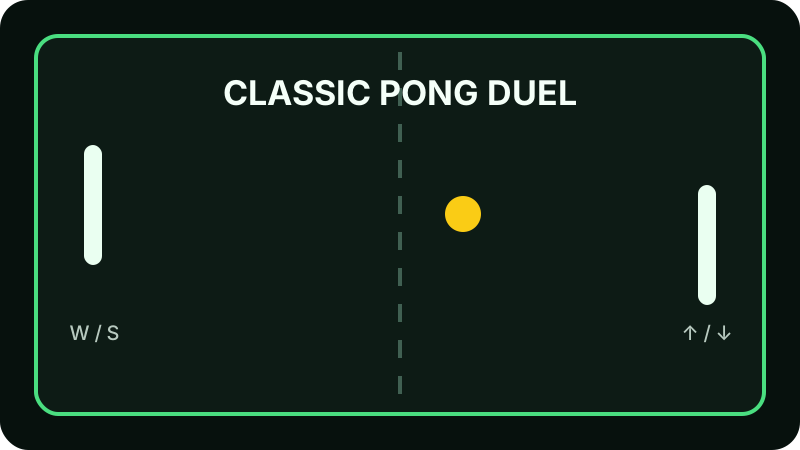
Classic Pong Duel
A same-keyboard Pong duel with one paddle per player and quick first-to-score rounds.
Browse on mobile; this game requires a physical keyboard
How to choose a two-player browser game
What are 2 player unblocked games?
In this collection, the phrase means small browser games designed for two people on the same device, with no installer and no Luma account. The games use local keyboard controls and do not depend on a third-party game mirror. Network access policies still belong to the school, workplace, family, or network owner.
Best same-keyboard games
Classic Pong Duel and Key Sprint Duel are simultaneous same-keyboard games. Each player gets a separate key set, so both players can act at the same time without passing the keyboard back and forth.
Best racing game
Key Sprint Duel is a short original keyboard race. P1 alternates A and D while P2 alternates the left and right arrow keys. Browser key repeat does not count, so clean alternating input matters more than holding a key.
Best puzzle game
Grid Claim Duel is a local turn-based territory puzzle. Players move one cursor on alternating turns and claim empty cells, making it a calmer option when simultaneous controls are not ideal.
Best quick game
Classic Pong Duel has the simplest rules: move your paddle, keep the ball in play, and score when the other player misses. It is the fastest game here to explain to a second player.
Chromebook support
These runtimes are plain self-hosted HTML, CSS and JavaScript. A Chromebook with a modern browser and a physical keyboard can use the documented keys, subject to the device owner’s normal network and browser policies.
Phone and tablet support
The collection page is responsive on mobile, but the v1 games require physical keyboard input. We label that limitation instead of pretending touch controls exist. A phone or tablet can browse the page and license information, but gameplay is not marked mobile-ready.
Controls and device support
| Game | Type | P1 controls | P2 controls | Keyboard | Mobile |
|---|---|---|---|---|---|
| Classic Pong Duel | Arcade | W / S | Arrow Up / Arrow Down | Required | Page supported; physical keyboard required for play |
| Key Sprint Duel | Racing | A / D (alternate) | Left / Right (alternate) | Required | Page supported; physical keyboard required for play |
| Grid Claim Duel | Puzzle | WASD + F | Arrow keys + Enter | Required | Page supported; physical keyboard required for play |
Source, license and hosting notes
Playable games enter this page only after the source and redistribution path are documented. No third-party iframe or mirror is treated as authorization evidence.
Classic Pong Duel
- Author / provenance
- James Nikolson; Luma integration changes
- License
- MIT
- Runtime
- Self-hosted on Luma; no extra game resources
Key Sprint Duel
- Author / provenance
- Luma Game Hub
- License
- Luma Original / MIT
- Runtime
- Self-hosted on Luma; no extra game resources
Grid Claim Duel
- Author / provenance
- Luma Game Hub
- License
- Luma Original / MIT
- Runtime
- Self-hosted on Luma; no extra game resources
Frequently asked questions
- Do I need to download these 2 player games?
- No. The three v1 games run from Luma-hosted browser files. You do not need an installer, extension, APK, desktop client, or Luma account.
- Can two people play on the same keyboard?
- Yes. Classic Pong Duel and Key Sprint Duel use separate key sets for simultaneous play. Grid Claim Duel is turn-based and uses a different key set for each player.
- Do these games work on Chromebook?
- They are built from standard browser technologies and use physical keyboard input. Actual access can still be limited by the Chromebook owner, browser configuration, or network policy.
- Can I play on iPhone or Android?
- The page itself works on mobile layouts, but the v1 games are not advertised as touch games. Use a desktop, laptop, or other device with a physical keyboard for the documented controls.
- Does “unblocked” mean this page bypasses school filters?
- No. “Unblocked” describes a common search phrase and low-friction browser-game category. Luma does not provide instructions or technology for bypassing school, workplace, family, or network controls.