Crazy Kick!
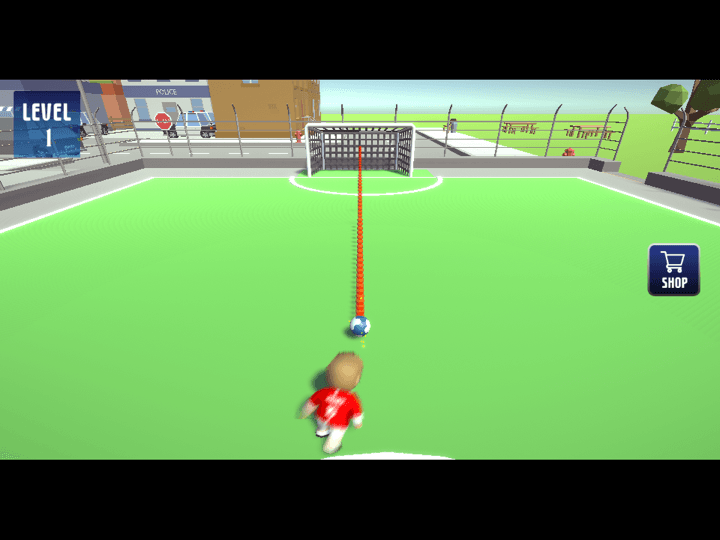
HOTCrazy Kick flips the usual soccer game idea: instead of controlling a full team, you directly guide the ball. Each level asks you to dodge defenders, collect useful coins or stars when safe, and curve the ball into the goal without getting blocked.
Crazy Kick!
The third-party game loads only after you click, keeping the first view faster.
💡Use in-game fullscreen; controls are listed below.
Today's picks
Try another game
Crazy Kick quick guide
Crazy Kick flips the usual soccer game idea: instead of controlling a full team, you directly guide the ball. Each level asks you to dodge defenders, collect useful coins or stars when safe, and curve the ball into the goal without getting blocked.
What to focus on while playing
The easiest mistake is aiming straight at the net from the start. A better approach is to read the defender path, make one clean side movement, then attack the open lane. The ball can turn quickly, but sharp late turns often send it into a defender.
Use this page for practical browser play: mouse and touch control, dribbling lines, when to skip collectibles, and how to keep the session no-download.
How to play
- 1Move the ball around defenders and obstacles on the way to the goal.
- 2Collect coins or stars only when the route remains safe.
- 3Shoot through the open angle and complete the level by getting the ball into the net.
Controls
Move ball
Use the mouse, trackpad, or finger to steer the ball.
Shoot
Guide the ball into the goal area; the browser version handles the final kick.
Restart
Retry when a defender blocks your route or the ball leaves the useful lane.
Practical tips
- ✓Look at the defender pattern before moving; the open lane is often on the side, not the middle.
- ✓Skip a coin if collecting it forces a tight turn in front of a defender.
- ✓On mobile, use slower swipes because oversteering is easier with touch input.
- ✓Approach the goal from an angle so the final defender has less time to block the shot.
FAQ
- What makes Crazy Kick different from regular soccer games?
- You control the ball directly instead of controlling players, so the main skill is steering around defenders and finding the goal lane.
- How do I stop defenders from blocking every shot?
- Wait for the defender movement, move around the side, and shoot from an angle instead of driving straight down the middle.
- Does Crazy Kick require an app install?
- No. Play the browser version on Luma and avoid APK, installer, or extension prompts.
Related guides
Today's picks
Try another game
Game Info
Status
ActiveHot
👨💻Listed Source
4399 游戏平台↗This is public source or distribution-page information, not a verified original developer claim.
💡Game Tips
- ✓Look at the defender pattern before moving; the open lane is often on the side, not the middle.
- ✓Skip a coin if collecting it forces a tight turn in front of a defender.
- ✓On mobile, use slower swipes because oversteering is easier with touch input.
- ✓Approach the goal from an angle so the final defender has less time to block the shot.
Similar Games
Adam and Eve 4
Adam and Eve 4 is a light point-and-click puzzle adventure where progress comes from reading the scene before clicking. The best approach is to test objects in order, notice what changes, and avoid random clicking that makes the puzzle harder to understand.

Adam and Eve 5: Part 1
Adam and Eve 5: Part 1 is a point-and-click puzzle adventure where every scene is solved by changing the environment in the right order. The fastest progress comes from spotting the obstacle, testing nearby objects once, and watching each animation before choosing the next click.

Adam and Eve 5: Part 2
Adam and Eve 5: Part 2 continues the point-and-click puzzle format with new scenes and slightly trickier object order. Good runs come from treating each screen like a chain: solve the blocker, watch the reaction, then use the next object that appears or changes.